
Retrieve Multiple Records from CRM JavaScript: 5 Proven Xrm.WebApi Patterns for 2026
If you’ve ever needed to retrieve multiple records from CRM JavaScript and found yourself tangled in deprecated SDK calls, broken promises, or throttling errors that only appear in production — you’re not alone. As Dataverse continues to evolve, Microsoft’s Xrm.WebApi client-side interface has matured into the definitive, supported mechanism for querying records directly from model-driven app forms, ribbons, and web resources.
Table of Contents
Yet many Dynamics 365 consultants and Power Platform makers are still copy-pasting outdated XMLHttpRequest snippets from old blog posts, leaving performance, reliability, and maintainability on the table. This guide cuts through the noise.
Whether you’re filtering accounts by territory, pulling related opportunity lines into a custom grid, or orchestrating multi-entity lookups for a complex business rule, you’ll walk away with battle-tested Xrm.WebApi patterns, OData query strategies, FetchXML alternatives, robust pagination techniques, and async/await best practices that will make your Dataverse JavaScript cleaner, faster, and upgrade-proof.
Let’s build something solid.
Why Retrieve Multiple Records from CRM JavaScript Still Matters in 2026
The Evolution from SOAP Endpoints to Xrm.WebApi
The Dynamics 365 client-side API landscape has changed dramatically over the past decade. Microsoft deprecated the SOAP endpoint for model-driven apps and later sunset the older REST endpoint. Today, Xrm.WebApi is the only officially supported client-side interface for Dataverse record retrieval.
This matters because scripts built on deprecated endpoints break silently during platform updates. If your org runs on Dataverse and your web resources still reference XrmServiceToolkit or raw SOAP calls, you’re carrying technical debt that will eventually cost you.
When Client-Side Queries Beat Server-Side Plugins
Not every data retrieval scenario belongs in a server-side plugin or Power Automate flow. Here’s a quick comparison:
- Server-side plugins: Best for enforcing business logic on every save, regardless of the client. Higher latency for UI scenarios.
- Power Automate flows: Best for async background processing. Not suitable for blocking UI interactions.
- Client-side JavaScript with
Xrm.WebApi: Best for responsive UX — populating fields on form load, validating duplicates before save, and driving dynamic visibility rules.
Common Real-World Scenarios That Demand Multi-Record Retrieval
Here are scenarios where you genuinely need to retrieve multiple records from CRM JavaScript:
- Auto-populating lookup fields based on related records when a parent field changes
- Validating duplicate records before allowing a form save
- Loading child records into a PCF component or custom subgrid substitute
- Building dynamic ribbon visibility rules based on related entity counts
- Simulating cascading dropdowns using filtered lookup queries
Microsoft’s continued investment in Dataverse Web API versioning (currently v9.2+) means the patterns you learn today are designed for long-term stability. You can review the official Dataverse Web API reference to track version-specific changes.
Understanding the Xrm.WebApi.retrieveMultipleRecords Method Signature
Breaking Down the Three Core Parameters
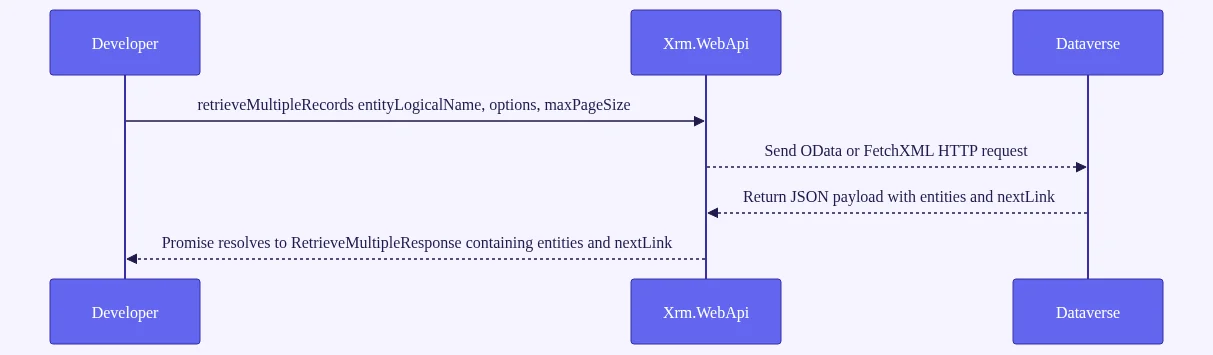
The Xrm.WebApi.online.retrieveMultipleRecords method accepts three parameters:
Xrm.WebApi.online.retrieveMultipleRecords(entityLogicalName, options, maxPageSize)
entityLogicalName— A lowercase string. Use the logical name of the table, not the display name. For standard tables, no publisher prefix is needed (e.g.,"account","contact","opportunity").options— An OData query string (e.g.,"?$select=name&$filter=statecode eq 0") or a URL-encoded FetchXML string.maxPageSize— An integer between 1 and 5000. Defaults to 5000 if omitted. Set this intentionally — leaving it at 5000 on large tables risks slow responses and large payloads.
Promise Resolution: The RetrieveMultipleResponse Object Explained
The method returns a native ES6 Promise that resolves to a RetrieveMultipleResponse object:
{
  entities: [...],      // Array of plain JS objects
  nextLink: string | undefined  // URL for the next page, if more records exist
}
Each entity in the array is a plain JavaScript object keyed by attribute logical name. Here’s how specific data types come back:
- GUIDs: returned as plain strings
- OptionSet values: returned as integers; formatted label available via
attributename@OData.Community.Display.V1.FormattedValue - Lookups: GUID via
_lookupfield_value, entity type via_lookupfield_value@Microsoft.Dynamics.CRM.lookuplogicalname - DateTime: returned as ISO 8601 UTC strings
Online vs. Offline Context
Use Xrm.WebApi.online (with the .online property) when you need to guarantee the call goes to the server — not a cached offline store. This is especially important if your org uses mobile offline profiles.
Here’s a minimal working example using async/await:
async function getActiveAccounts() {
  try {
    const response = await Xrm.WebApi.online.retrieveMultipleRecords(
      "account",
      "?$select=name,accountnumber&$filter=statecode eq 0&$top=10",
      10
    );
    console.log("Accounts retrieved:", response.entities);
    return response.entities;
  } catch (error) {
    console.error("Error retrieving accounts:", error.message);
  }
}
For teams that prefer the .then() chain, both patterns are supported — but async/await is the cleaner choice for 2026 codebases.
How to Retrieve Multiple Records from CRM JavaScript Using OData Query Options
Crafting $select, $filter, and $orderby Clauses for Dataverse
OData query options are your primary tool for precise, performant Dataverse JavaScript API queries. Always start with $select. Retrieving a full Contact record with 80+ attributes versus selecting 5 specific columns can result in payloads that are many times larger — a real cost on mobile connections or high-concurrency form loads.
The most common OData operators for $filter:
eq/ne— equals / not equalsgt/lt/ge/le— greater/less than comparisonsand/or/not— logical combinators
A realistic example — retrieve active contacts created in the last 30 days:
const thirtyDaysAgo = new Date();
thirtyDaysAgo.setDate(thirtyDaysAgo.getDate() - 30);
const isoDate = thirtyDaysAgo.toISOString();

const options = `?$select=fullname,emailaddress1,createdon` +
  `&$filter=statecode eq 0 and createdon ge ${isoDate}` +
  `&$orderby=createdon desc`;

const result = await Xrm.WebApi.online.retrieveMultipleRecords("contact", options, 50);
Use $orderby with comma-separated fields for multi-column sorting: $orderby=lastname asc,createdon desc.
Using $expand to Retrieve Related Entity Data in One Call
$expand lets you pull related entity data in a single API call — a major performance win over separate sequential queries. Use it for N:1 (single-valued) navigation properties:
const options = `?$select=name,estimatedvalue,estimatedclosedate` +
  `&$filter=statecode eq 0 and _accountid_value eq ${accountId}` +
  `&$expand=ownerid($select=fullname)` +
  `&$orderby=estimatedclosedate asc` +
  `&$top=5`;

const result = await Xrm.WebApi.online.retrieveMultipleRecords("opportunity", options, 5);
Advanced Filtering: Lambda Operators and OData Functions
OData standard query functions supported by Dataverse include:
startswith(field,'value')— prefix matchendswith(field,'value')— suffix matchcontains(field,'value')— substring match (use carefully on large text fields — no index benefit)
Watch out for these common mistakes:
- Using display names instead of logical names in filter strings
- Forgetting to URL-encode special characters (spaces, ampersands) in dynamic filter values
- Hitting the URL length limit for complex GET requests — switch to FetchXML if your query string exceeds roughly 2,000 characters
Using FetchXML with Xrm.WebApi to Retrieve Multiple Records from CRM JavaScript
When to Choose FetchXML Over OData Query Strings
FetchXML is a Dataverse-specific XML query language that unlocks capabilities OData can’t match cleanly. Choose Dynamics 365 retrieveMultipleRecords FetchXML JavaScript patterns when you need:
- Aggregate queries:
count,sum,avg,min,maxwithgroupby - Many-to-many relationship traversal without exposing the junction entity
- Queries that exceed OData URL length limits
- Complex linked-entity filtering across multiple hops
Building and Encoding FetchXML Queries for Client-Side Use
The easiest way to build FetchXML is to use the Advanced Find designer in your model-driven app, run the query, then click Download Fetch XML. This gives you a verified query you can adapt for code.
Once you have your FetchXML string, URL-encode it before passing it as the options parameter:
const fetchXml = `<fetch version="1.0" output-format="xml-platform" mapping="logical">
  <entity name="task">
    <attribute name="subject"/>
    <attribute name="statecode"/>
    <link-entity name="incident" from="incidentid" to="regardingobjectid">
      <filter>
        <condition attribute="incidentid" operator="eq" value="${caseId}"/>
      </filter>
    </link-entity>
  </entity>
</fetch>`;

const encodedFetch = encodeURIComponent(fetchXml);
const result = await Xrm.WebApi.online.retrieveMultipleRecords("task", encodedFetch, 100);
Dataverse automatically detects FetchXML when the options string begins with <fetch (after decoding). No special flag is required.
Executing FetchXML Queries and Parsing the Response
After retrieving the results, you can display a summary using the Xrm notification API:
const count = result.entities.length;
await Xrm.Navigation.openAlertDialog({
  text: `Found ${count} tasks linked to this case.`,
  title: "Task Summary"
});
For aggregate FetchXML, add aggregate="true" to the <fetch> element and use aggregate and groupby attributes on <attribute> nodes. The response entities will contain the computed values keyed by the alias you define.
Mastering Dataverse Web API Pagination in JavaScript

OData nextLink: Looping Through Large Result Sets
Dataverse enforces a hard server-side limit of 5,000 records per page — regardless of your maxPageSize setting. Scripts that assume all records fit in one response will silently miss data. This is one of the most dangerous silent bugs in Dynamics 365 customizations.
The Xrm.WebApi paging large datasets Dataverse pattern uses the nextLink property:
async function getAllRecords(entityName, options, maxPages = 10) {
  let allEntities = [];
  let currentOptions = options;
  let pageCount = 0;

  while (currentOptions && pageCount < maxPages) {
    const response = await Xrm.WebApi.online.retrieveMultipleRecords(
      entityName,
      currentOptions,
      250
    );
    allEntities = allEntities.concat(response.entities);
    currentOptions = response.nextLink || null;
    pageCount++;
  }

  return allEntities;
}
The safety cap (maxPages = 10) prevents runaway loops in production if data grows unexpectedly. Prefer an iterative while loop over recursion — deep recursion on very large datasets risks call stack overflow.
FetchXML Paging Cookies: Server-Side Cursor Pagination
FetchXML uses a different pagination mechanism. After the first page, the response includes a @Microsoft.Dynamics.CRM.fetchxmlpagingcookie annotation. You inject this cookie into subsequent requests and increment the page attribute on the <fetch> element.
FetchXML paging cookies are required for aggregate queries and provide more deterministic ordering than OData nextLink. Use OData nextLink for standard queries and FetchXML cookies for aggregate or complex linked-entity queries.
Building a Reusable Pagination Helper Function
Performance tip: Never paginate to completion for UI operations. Only retrieve all records for background data processing. For interactive UI scenarios, implement lazy loading — retrieve the first page, show results, and load more only when the user requests it. This keeps your form load time fast and your users happy.
Async/Await Patterns and Error Handling Best Practices for CRM JavaScript
Structuring Async Xrm.WebApi Calls Without Blocking the UI
Xrm.WebApi methods return native ES6 Promises. Async/await is the cleanest syntax for modern Dynamics 365 web resource development and is fully supported across all current model-driven app clients.
The danger of fire-and-forget patterns: If an async function in a form onLoad event throws an unhandled error, the form may appear loaded while data is silently missing. Always await your calls and handle errors explicitly.
async function onFormLoad(executionContext) {
  try {
    const formContext = executionContext.getFormContext();
    const accountId = formContext.getAttribute("accountid").getValue()?.[0]?.id;
    if (!accountId) return;

    const records = await getAllRecords("opportunity",
      `?$select=name,estimatedvalue&$filter=_accountid_value eq ${accountId}`
    );
    // Process records...
  } catch (error) {
    console.error(`Retrieve failed [${error.errorCode}]: ${error.message}`);
    Xrm.Navigation.openAlertDialog({ text: "Could not load related data. Please refresh." });
  }
}
Comprehensive Error Handling: Network, Throttling, and Permission Errors
Map common HTTP error codes to developer actions:
| Error Code | Meaning | Action |
|---|---|---|
| 401 | Unauthorized | Check security role and field-level security |
| 403 | Forbidden | Missing privilege on the entity |
| 429 | Too Many Requests | Implement exponential backoff |
| 404 | Not Found | Verify entity logical name and record existence |
| 400 | Bad Request | Log the options string — malformed query |
For 429 throttling errors, implement an exponential backoff retry wrapper. According to Microsoft’s service protection limits documentation, Dataverse enforces limits of 6,000 requests per user per 5-minute sliding window. Scripts that loop retrievals in tight intervals will hit this ceiling.
async function withRetry(fn, maxRetries = 3) {
  let delay = 1000;
  for (let attempt = 0; attempt < maxRetries; attempt++) {
    try {
      return await fn();
    } catch (error) {
      if (error.errorCode === 429 && attempt < maxRetries - 1) {
        await new Promise(resolve => setTimeout(resolve, delay));
        delay *= 2; // Exponential backoff
      } else {
        throw error;
      }
    }
  }
}
Chaining Multiple Retrieve Calls: Sequential vs. Parallel Execution
Use Promise.all() when retrieving independent datasets simultaneously:
// Parallel — fast, for independent queries
const [accounts, contacts] = await Promise.all([
  Xrm.WebApi.online.retrieveMultipleRecords("account", "?$select=name&$top=10"),
  Xrm.WebApi.online.retrieveMultipleRecords("contact", "?$select=fullname&$top=10")
]);
Use sequential await for dependent queries where the result of one feeds the next:
// Sequential — when second query depends on first result
const accountResult = await Xrm.WebApi.online.retrieveMultipleRecords("account",
  `?$select=name&$filter=statecode eq 0&$top=1`);
const accountId = accountResult.entities[0]?.accountid;

const contacts = await Xrm.WebApi.online.retrieveMultipleRecords("contact",
  `?$select=fullname&$filter=_accountid_value eq ${accountId}`);
Performance Optimization When You Retrieve Multiple Records from CRM JavaScript
Query Design Principles That Reduce Payload and Latency
Every millisecond of form load time affects user adoption. Treat JavaScript data retrieval as a first-class performance concern.
Core performance rules:
- Always use
$select— Retrieving only the columns you need dramatically reduces payload size. The difference between selecting 5 fields versus all fields on a record-heavy table can be substantial. - Filter server-side, not client-side — Never retrieve hundreds of records and filter them in JavaScript. Use
$filterto push the work to Dataverse. - Filter on indexed columns first —
statecode,statuscode,ownerid,createdon, and custom fields marked as “Searchable” in Dataverse are indexed. Lead with these in your filter to maximize query planner efficiency. - Set
maxPageSizeto the minimum needed — For interactive UI queries, 50–250 is almost always sufficient.
Client-Side Caching Strategies for Repeated Lookups
Reference data that doesn’t change within a session — territory lists, currency codes, product categories — should be cached rather than re-fetched on every form interaction.
const _cache = new Map();

async function getCachedRecords(entityName, options, ttlMs = 300000) {
  const cacheKey = `${entityName}:${options}`;
  const cached = _cache.get(cacheKey);

  if (cached && Date.now() - cached.timestamp < ttlMs) {
    return cached.data;
  }

  const result = await Xrm.WebApi.online.retrieveMultipleRecords(entityName, options, 250);
  _cache.set(cacheKey, { data: result.entities, timestamp: Date.now() });
  return result.entities;
}
Avoiding Common Anti-Patterns That Kill Form Performance
Anti-patterns to eliminate from your codebase:
- N+1 query pattern: Looping over 20 records and calling
retrieveRecordfor each one. Use$expandor a single FetchXML linked-entity query instead. - No
$select: Retrieving full entity records client-side. Always specify columns. - No debounce on onChange handlers: If a field change triggers a retrieve, wrap it in a 300ms debounce to prevent rapid successive API calls during fast typing.
- No safety cap on pagination loops: A
while(nextLink)loop with no iteration limit can spin indefinitely if data grows.
Use the Network tab in browser DevTools, filtering on /api/data/, to measure actual Dataverse API call duration and identify slow queries. This is the fastest way to spot performance problems in real environments.
For deeper reading on API performance patterns, the MDN Web Docs on the Fetch API provides useful context on how modern JavaScript handles async HTTP — the same principles apply to Xrm.WebApi under the hood.
Real-World Code Patterns: Retrieve Multiple Records from CRM JavaScript in Action
Pattern 1: Duplicate Detection Before Record Save
Register this on the form’s OnSave event to prevent duplicate records:
async function checkDuplicatesOnSave(executionContext) {
  const formContext = executionContext.getFormContext();
  const name = formContext.getAttribute("name").getValue();
  const email = formContext.getAttribute("emailaddress1").getValue();

  if (!name || !email) return;

  const filter = `?$select=contactid,fullname` +
    `&$filter=fullname eq '${encodeURIComponent(name)}' and emailaddress1 eq '${email}'` +
    `&$top=1`;

  try {
    const result = await Xrm.WebApi.online.retrieveMultipleRecords("contact", filter, 1);

    if (result.entities.length > 0) {
      executionContext.getEventArgs().preventDefault();
      await Xrm.Navigation.openConfirmDialog({
        title: "Duplicate Detected",
        text: `A contact named "${name}" with this email already exists. Do you still want to save?`
      });
    }
  } catch (error) {
    console.error("Duplicate check failed:", error.message);
  }
}
Pattern 2: Cascading Dropdown Simulation Using Filtered Lookups
When a parent lookup changes, retrieve active child records and filter the dependent lookup. Register on the parent field’s OnChange event:
async function onCountryChange(executionContext) {
  const formContext = executionContext.getFormContext();
  const countryValue = formContext.getAttribute("new_countryid").getValue();

  if (!countryValue) return;

  const countryId = countryValue[0].id.replace(/[{}]/g, "");
  const options = `?$select=new_regionid,new_name` +
    `&$filter=_new_countryid_value eq ${countryId} and statecode eq 0` +
    `&$orderby=new_name asc`;

  try {
    const result = await Xrm.WebApi.online.retrieveMultipleRecords("new_region", options, 100);
    console.log(`Loaded ${result.entities.length} regions for selected country.`);
    // Apply results to a custom PCF control or addCustomFilter logic
  } catch (error) {
    console.error("Region load failed:", error.message);
  }
}
Pattern 3: Team Membership Check for Conditional UI
A lightweight alternative to server-side security checks for UX purposes — check if the current user belongs to a specific team before showing a form section:
async function checkTeamMembership(formContext, teamName) {
  const userId = Xrm.Utility.getGlobalContext().getUserId().replace(/[{}]/g, "");

  const fetchXml = encodeURIComponent(`<fetch top="1">
    <entity name="teammembership">
      <attribute name="teammembershipid"/>
      <link-entity name="team" from="teamid" to="teamid">
        <filter>
          <condition attribute="name" operator="eq" value="${teamName}"/>
        </filter>
      </link-entity>
      <filter>
        <condition attribute="systemuserid" operator="eq" value="${userId}"/>
      </filter>
    </entity>
  </fetch>`);

  const result = await Xrm.WebApi.online.retrieveMultipleRecords("teammembership", fetchXml, 1);
  return result.entities.length > 0;
}
TypeScript note: If your team uses TypeScript for web resources, the @types/xrm package provides full type definitions for all Xrm.WebApi methods. This catches logical name typos and response shape mismatches at compile time — a significant quality-of-life improvement for larger projects.
For more on building robust Power Platform solutions, explore our guides on Xrm.WebApi createRecord best practices and Power Platform ALM for JavaScript web resources.
Frequently Asked Questions
How do I retrieve multiple records from CRM JavaScript without hitting the 5000-record limit?
Use the nextLink property returned in the RetrieveMultipleResponse object to paginate through result sets. After each Xrm.WebApi.retrieveMultipleRecords call, check if response.nextLink is defined and pass it as the options parameter in your next call. Wrap this in a while loop with a safety cap (e.g., max 20 iterations) to prevent runaway loops. For FetchXML queries, use the paging cookie mechanism instead, incrementing the page attribute on the <fetch> element with each request.
What is the difference between Xrm.WebApi.retrieveMultipleRecords and a raw fetch() call to the Dataverse Web API?
Xrm.WebApi.retrieveMultipleRecords is the officially supported, context-aware abstraction that automatically handles authentication tokens, the correct API endpoint URL, and response parsing. A raw fetch() call gives you more control (for example, setting custom Prefer headers) but requires you to manually manage bearer tokens and endpoint construction. For standard model-driven app scripting, always prefer Xrm.WebApi unless you have a specific need that the abstraction doesn’t support.
Can I use FetchXML with Xrm.WebApi.retrieveMultipleRecords in Dynamics 365?
Yes. Pass your FetchXML XML string directly as the options parameter — Dataverse detects it automatically when the string begins with <fetch. Ensure the string is properly URL-encoded using encodeURIComponent() before passing it. FetchXML is particularly useful for aggregate queries (count, sum, groupBy), many-to-many relationship traversal, and queries that would exceed OData URL length limits. Build and test your FetchXML using the Advanced Find export feature in model-driven apps.
How do I handle throttling (HTTP 429) errors when making multiple Dataverse JavaScript API calls?
Implement an exponential backoff retry wrapper around your Xrm.WebApi calls. When you catch an error with errorCode 429, wait before retrying — start at one second and double the delay with each retry, up to a maximum of three to five attempts. Design your scripts to avoid tight retrieval loops by batching queries, caching reference data in sessionStorage, and using Promise.all() for parallel independent queries rather than sequential loops.
What are the best OData query options to use for performance when retrieving Dataverse records in JavaScript?
Always include $select with only the specific columns you need — this is the single biggest performance lever available. Use $filter with indexed columns (statecode, ownerid, createdon) to minimize server-side scan costs. Set maxPageSize to the smallest value that satisfies your UI requirement (50–250 for interactive queries). Avoid $expand on collection-valued navigation properties unless absolutely necessary, as these trigger additional sub-queries.
Is Xrm.WebApi.retrieveMultipleRecords supported in Power Pages and canvas apps?
Xrm.WebApi is specific to the model-driven app client context — forms, ribbons, and web resources. It is not available in Power Pages or canvas apps. For Power Pages, use the Dataverse Web API via authenticated fetch() calls with appropriate table permissions configured in the Power Pages security model. For canvas apps, use the Dataverse connector or direct Power Fx formulas like Filter() and LookUp(), which call the Dataverse API under the hood.
Conclusion
Mastering how to retrieve multiple records from CRM JavaScript is one of the highest-leverage skills a Dynamics 365 developer or Power Platform maker can invest in. From clean OData $filter queries and FetchXML aggregates to bulletproof pagination, async error handling, and performance-first design, the patterns in this guide give you a complete toolkit for building responsive, reliable, and upgrade-proof Dataverse solutions.
The difference between a form that users love and one they complain about often comes down to how thoughtfully you’ve designed your client-side data retrieval layer. Start by refactoring your oldest, most brittle retrieve scripts using the async/await patterns and $select discipline covered here — the performance gains will be immediate and measurable.
Your next steps:
- Audit your existing web resources for
XMLHttpRequestor deprecated SDK calls and replace them withXrm.WebApi.online.retrieveMultipleRecords - Add
$selectto every existing retrieve call that’s missing it - Implement the pagination helper function for any script that could encounter more than 5,000 records
- Add the exponential backoff retry wrapper to any high-frequency retrieval scripts
If you found this guide valuable, bookmark it for your next customization sprint and share it with your Dynamics 365 team. Ready to go deeper? Explore our related guides on Xrm.WebApi createRecord best practices and PCF component data binding for model-driven apps to keep building your expertise.