Mastering Multi-Agent Orchestration in Microsoft Copilot Studio in 2026
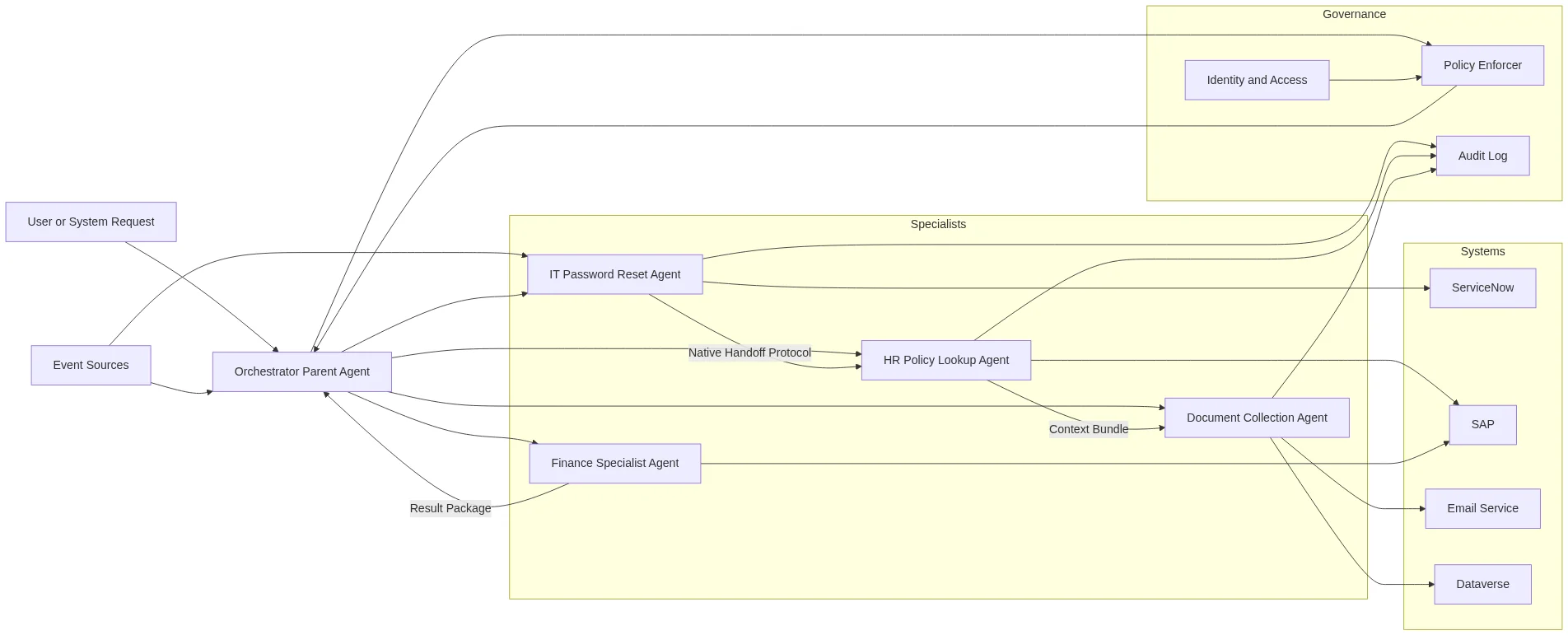
The enterprises pulling ahead in 2026 are not running smarter chatbots. They are running coordinated networks of specialized AI agents that hand off tasks automatically, complete complex workflows end-to-end, and do it all inside a governance framework their compliance teams can actually audit. If your organization is still deploying AI one agent at a time, the gap is widening faster than you think. Multi-agent orchestration in Microsoft Copilot Studio is the architecture closing that gap — and this guide breaks down exactly how it works, how to build it, and how to govern it responsibly.
Table of Contents
What Is Multi-Agent Orchestration — and How Is It Different from a Single Agent?
A single agent is like hiring one generalist consultant and asking them to handle legal review, financial modeling, and customer communication simultaneously. They can do it — but slowly, and with more errors than you want in a production system.
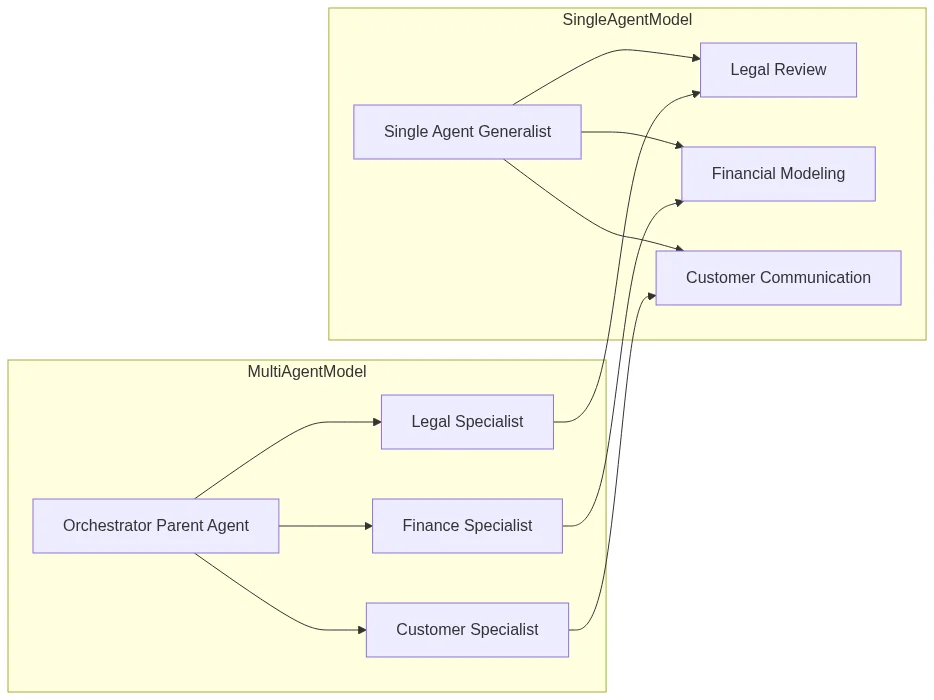
Multi-agent orchestration is the practice of coordinating a network of specialized AI agents — each scoped to a narrow domain — under a central orchestrator that routes tasks, manages context, and synthesizes results. In Microsoft Copilot Studio, this is implemented through a parent-child architecture:
- The Orchestrator (Parent Agent): The single entry point. It captures user intent, builds a plan, and delegates subtasks to the right specialist agents.
- The Specialists (Child/Connected Agents): Narrowly scoped agents designed for specific domains — “IT Password Reset,” “HR Policy Lookup,” “Document Collection,” and so on.
Think of it as a conductor leading a symphony orchestra. Instead of one musician attempting every instrument, each specialist plays their part precisely, and the conductor ensures every section performs in sync.
Why the Distinction Matters in Practice
With a single agent, every new capability you add increases complexity, token consumption, and error surface. With an orchestrated multi-agent setup, you can add a new specialist agent without touching existing ones. The system scales horizontally rather than growing into an unmanageable monolith.
Gartner predicted that by 2026, at least 15% of day-to-day work decisions will be made autonomously through agentic AI, up from essentially zero in 2024. Organizations building orchestration muscle now are positioning themselves well ahead of that curve — and the window for early-mover advantage is narrowing fast. It is worth noting that over 100,000 organizations had already adopted Copilot Studio as of Microsoft Build 2026, signaling that the platform has crossed the early-adopter threshold and entered mainstream enterprise deployment.
What Changed in 2026–2026: From Manual Handoffs to Autonomous Orchestration
This is the most important context shift for anyone updating their Copilot Studio strategy. The 2024 approach to multi-agent workflows relied heavily on manual handoff logic — developers had to explicitly define trigger conditions and routing rules in Power Automate flows, which meant brittle pipelines that broke when edge cases appeared.
The GA release of autonomous agent capabilities in late 2026 and the subsequent 2026 platform updates changed the model fundamentally. Here is what is new:
- Agent Flows: A new primitive in Copilot Studio that allows agents to autonomously trigger other agents based on context, not just predefined rules. The orchestrator evaluates intent at runtime and selects the appropriate specialist dynamically.
- Autonomous Trigger Capabilities: Agents can now initiate workflows in response to events — an email arriving, a record changing in Dataverse, a Teams message hitting a monitored channel — without a human kicking off the process.
- Native Agent-to-Agent Handoff Protocol: Microsoft introduced a structured handoff schema that passes context, conversation history, and user identity between agents without the developer needing to serialize and deserialize data manually.
- Expanded Connector Library: Over 1,400 connectors are now available in Copilot Studio, making it significantly easier to connect specialist agents to line-of-business systems like SAP, Salesforce, and ServiceNow.
- Alignment with Emerging Standards: Microsoft has begun aligning Copilot Studio’s handoff protocols with emerging agent communication standards, including its own Agent2Agent specification, positioning enterprise deployments for interoperability as the broader AI ecosystem matures.
The practical implication: workflows that took weeks to build and maintain in 2024 can now be assembled in days, with far less custom code holding them together.
A Real-World Scenario: The IT Helpdesk Transformation
Abstract concepts land better with a concrete example. Here is how multi-agent orchestration plays out in a high-volume IT helpdesk context — one of the most common early-adopter use cases in 2026.
The situation: An employee named Sarah opens a support ticket: “My laptop cannot connect to the VPN and I cannot access my email. I have a client presentation in two hours.”
In a traditional setup, Sarah waits in a queue, gets triaged by a generalist agent, and is bounced between teams. With multi-agent orchestration in Copilot Studio, the experience looks like this:
- Intent Capture: The Orchestrator receives Sarah’s message and identifies two distinct problems — a VPN connectivity issue and an email access failure — plus an urgency signal.
- Strategic Planning: The Orchestrator uses its built-in planner to determine the order of operations, flagging urgency and invoking specialist agents in parallel where possible.
- Agent 1 — Network Diagnostics Specialist: Connects to the IT monitoring system via a secure connector, runs a diagnostic against Sarah’s device profile, and identifies a stale VPN certificate.
- Agent 2 — Identity and Access Specialist: Simultaneously checks the email access issue, finds an expired MFA token, and triggers a silent re-authentication push to Sarah’s mobile device.
- Agent 3 — Escalation and Communication Agent: Detects the two-hour urgency window, drafts a proactive update to Sarah’s manager, and schedules a follow-up check-in.
- Synthesis: The Orchestrator compiles the results, delivers a single coherent response to Sarah with step-by-step resolution instructions, and logs the full interaction to the ITSM system.
What would have taken 45 minutes of back-and-forth resolves in under four minutes. Early adopters deploying similar pipelines report measurable reductions in mean time to resolution for Tier 1 and Tier 2 helpdesk tickets — a pattern that extends equally well to HR onboarding and sales qualification workflows.
How to Build a Multi-Agent System in Copilot Studio: A Step-by-Step Overview
You do not need to write a line of code to get a working multi-agent system running in Copilot Studio. Here is the logical sequence to follow.
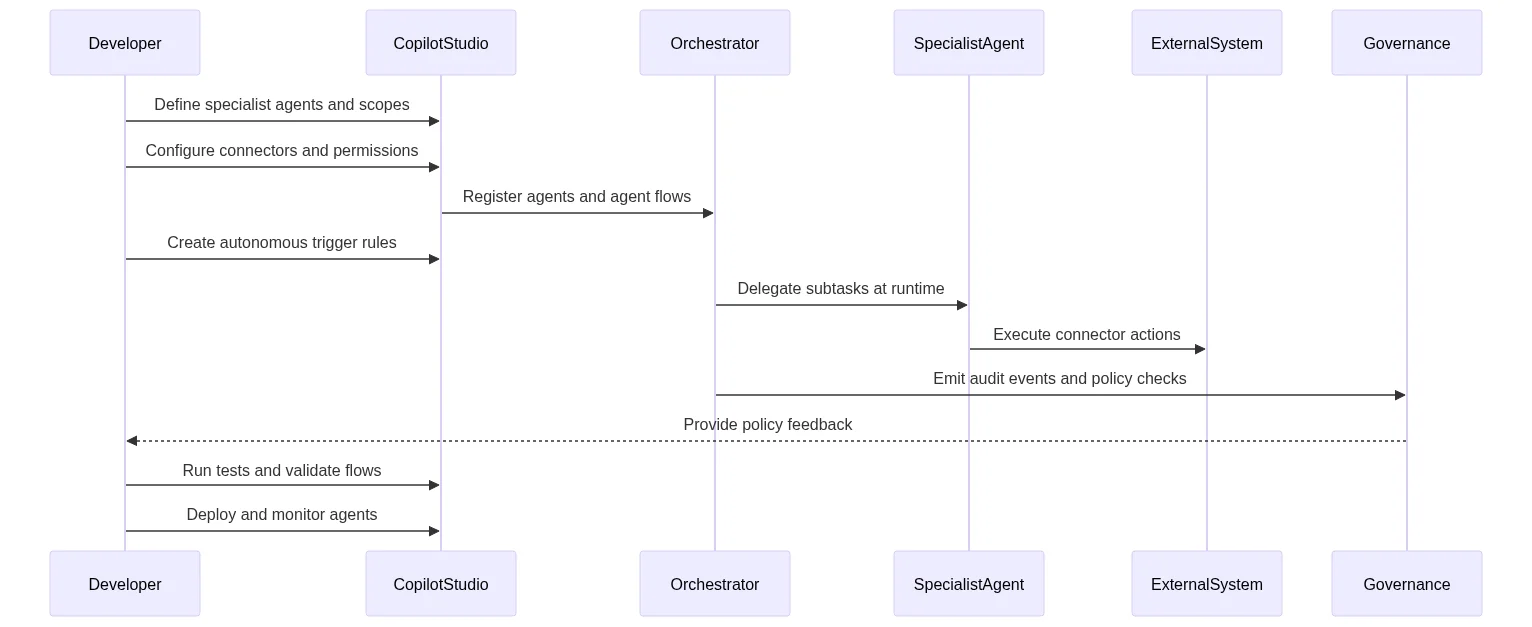
Step 1: Define Your Orchestration Map
Before touching the platform, map out your workflow on paper or a whiteboard. Answer these questions:
- What is the single entry point (the orchestrator’s job)?
- What are the distinct domains that warrant a specialist agent?
- What data does each agent need, and where does that data live?
- Where do agents need to hand off to each other, and in what order?
A clear orchestration map prevents the most common mistake: building an orchestrator that tries to do too much.
Step 2: Build Your Specialist Agents First
In Copilot Studio, navigate to Create and build each specialist agent independently. Keep each one narrowly scoped. A good specialist agent:
- Has a focused system prompt describing its single domain
- Connects to only the data sources it needs via the connector library
- Has clearly defined input parameters it expects from the orchestrator
- Returns a structured output the orchestrator can interpret
For integrations with ServiceNow, Salesforce, or SAP, use the pre-built connectors in the library. For custom internal systems, the HTTP connector with OAuth 2.0 authentication handles most enterprise scenarios. If you need guidance on building your first agent from scratch, our beginner’s guide to Copilot Studio walks through the fundamentals step by step.
Step 3: Configure the Orchestrator Agent
Create a new agent and designate it as the orchestrator. In the Connections panel, add each of your specialist agents as connected agents. Copilot Studio will surface them as callable skills the orchestrator can invoke.
Configure the orchestrator’s system prompt to:
- Describe its role as a router, not a domain expert
- List the specialist agents available and their capabilities
- Define escalation logic for scenarios no specialist can handle
Step 4: Enable Agent Flows for Autonomous Triggering
If your use case requires proactive, event-driven behavior (not just reactive responses to user queries), enable Agent Flows in the orchestrator settings. Map your trigger events — a new row in Dataverse, an incoming email, a calendar event — to the appropriate orchestration logic.
This is where the 2026–2026 platform updates deliver the most visible value. Agent Flows replace the brittle Power Automate workarounds that characterized 2024-era deployments.
Step 5: Test with the Multi-Agent Debugger
Copilot Studio’s built-in debugger now includes a multi-agent trace view that shows exactly which agent was invoked, what data was passed, and how long each step took. Use this before deploying to production. Look specifically for:
- Context loss between handoffs (a sign your handoff schema is incomplete)
- Infinite loops where two agents keep delegating to each other
- Latency spikes that indicate a connector or external API is the bottleneck
Copilot Studio vs. Semantic Kernel vs. Azure AI Foundry: Choosing the Right Tool
A question that comes up constantly in enterprise architecture discussions: do we use Copilot Studio, or do we build with Semantic Kernel or Azure AI Foundry? The honest answer is that these tools are not fully competing — they occupy different points on the build-vs.-configure spectrum.
| Dimension | Copilot Studio | Semantic Kernel | Azure AI Foundry |
|---|---|---|---|
| Primary user | Business analyst / power user | Developer | ML engineer / architect |
| Code required | Minimal (low-code) | Yes (C#, Python, Java) | Yes (Python, REST APIs) |
| Time to first agent | Hours | Days | Days to weeks |
| Customization ceiling | Moderate | High | Very high |
| Governance tooling | Built-in (DLP, audit) | Manual implementation | Configurable |
| Best for | Enterprise workflow automation | Custom AI application development | Large-scale model deployment |
For most enterprise teams automating business processes — HR, IT, sales, finance — Copilot Studio is the right starting point. It sits on top of the same Azure AI infrastructure as Foundry, so you are not sacrificing model quality for convenience. When you hit the ceiling of what low-code can do, Semantic Kernel and Azure AI Foundry are the natural next step. For a deeper comparison, our Semantic Kernel vs. Copilot Studio analysis covers the architectural trade-offs in detail.
The broader market context supports this tiered approach. IDC forecasts worldwide spending on AI solutions — including agentic and multi-agent platforms — to reach $632 billion by 2028, growing at a 29% CAGR. That growth is being driven by both enterprise developers and business teams, which is precisely why Microsoft has invested in both the low-code and pro-code ends of the spectrum simultaneously.
Security and Governance: The Non-Negotiable Layer
Multi-agent systems introduce a governance challenge that single-agent deployments do not face at the same scale: the attack surface multiplies with every agent you add. A prompt injection attack against one specialist agent can, without proper guardrails, propagate instructions through the entire orchestration chain.
Microsoft’s 2026 updates to Copilot Studio’s governance layer address this directly. Here is what you need to configure before going to production:
Data Loss Prevention (DLP) Policies
DLP policies in Copilot Studio now apply at the agent level, not just the environment level. This means you can restrict a specialist agent from passing certain data classifications — PII, financial records, health information — to other agents or external connectors, even within the same orchestration pipeline. Our guide to DLP and compliance in Copilot Studio covers the configuration steps in depth.
Agent Authentication and Identity
Each agent in a multi-agent system should operate under its own managed identity in Microsoft Entra ID (formerly Azure AD). This ensures that if one agent is compromised or misconfigured, its blast radius is limited to its own permissions scope. Avoid the common shortcut of running all agents under a single service account — it is convenient until it is a security incident.
Audit Trails and Conversation Logging
Enable conversation transcript logging for all agents and route logs to your SIEM (Microsoft Sentinel integrates natively). In regulated industries, you will also want to configure retention policies that align with your compliance obligations. The multi-agent trace data generated by Copilot Studio’s debugger is also available in production logs — use it for both compliance auditing and performance optimization.
Human-in-the-Loop Escalation
For any workflow where an agent decision has material consequences — approving a loan, terminating a vendor contract, modifying access permissions — build in a mandatory human approval step. Copilot Studio’s adaptive card integration with Teams makes this straightforward to implement without breaking the flow of the orchestration.
Frequently Asked Questions
What is the difference between multi-agent orchestration and a standard Copilot Studio chatbot? A standard chatbot handles one conversation thread with one agent. Multi-agent orchestration coordinates several specialized agents under a central orchestrator that routes tasks, manages context across agents, and synthesizes a unified response. The result is a system that can handle complex, multi-step workflows that a single agent would struggle to complete accurately.
Do I need to write code to build a multi-agent system in Copilot Studio? No. Copilot Studio is a low-code platform. You can configure orchestrators, connect specialist agents, set up triggers, and define handoff logic entirely through the visual interface. Developers can extend functionality with custom connectors or Power Fx expressions, but coding is not a prerequisite for most enterprise use cases.
Can Copilot Studio agents integrate with third-party tools like ServiceNow, Salesforce, or SAP? Yes. Copilot Studio provides access to over 1,400 pre-built connectors through the Power Platform connector library, including connectors for ServiceNow, Salesforce, SAP, and hundreds of other enterprise systems. For systems without a pre-built connector, the HTTP connector supports custom API integrations with standard authentication protocols.
How does Microsoft ensure multi-agent systems comply with enterprise security standards? Microsoft’s 2026 governance updates include agent-level DLP policies, managed identity support through Microsoft Entra ID, conversation transcript logging, and native integration with Microsoft Sentinel for SIEM routing. Enterprises in regulated industries can layer additional compliance controls through the Power Platform admin center.
How does Copilot Studio’s multi-agent capability compare to building with Semantic Kernel? Copilot Studio is the faster, lower-code path suited to business analysts and power users automating enterprise workflows. Semantic Kernel is a developer framework offering deeper customization for teams building custom AI applications. They are complementary — many organizations use Copilot Studio for business-process agents and Semantic Kernel for bespoke application development. Our full comparison covers when to use each.
The Bottom Line
Multi-agent orchestration in Microsoft Copilot Studio has moved from an experimental architecture to a production-ready capability that enterprise teams can deploy today — without a large developer team and without sacrificing the governance controls that compliance requires. The organizations investing in this capability now are not just automating tasks; they are building the operational infrastructure for how work gets done in an AI-first environment.
If you are ready to move from theory to implementation, start with building your first Copilot Studio agent and work up to the orchestration patterns covered here — the learning curve is shorter than most teams expect, and the productivity returns arrive quickly.
References & Read More
Related Wealth Stack guides:
- Export and import Copilot agents
- Copilot Studio telemetry with Application Insights
- Autonomous agents in Dynamics 365
External sources:
2 thoughts on “Mastering Multi-Agent Orchestration in Microsoft Copilot Studio”