
Microsoft 365 Copilot 2026: 7 Essential Agent Capabilities Revealed in Wave 2
If you thought the first wave of Microsoft 365 Copilot changed how enterprises work, brace yourself. Microsoft 365 Copilot 2026 is a category-defining leap forward. Wave 2 doesn’t just add features — it fundamentally rewires how AI agents, collaborative workspaces, and business process automation converge inside the Microsoft ecosystem.
Table of Contents
For Microsoft developers, Dynamics 365 consultants, Power Platform makers, and IT pros, this isn’t an optional upgrade to monitor from the sidelines. It’s a strategic inflection point that will separate organizations that thrive from those that fall behind.
In this deep-dive guide, we’ll unpack every major capability introduced in Wave 2 — from autonomous multi-agent orchestration and Copilot Pages to enterprise governance frameworks and real-world deployment blueprints — so you can walk away with a concrete action plan, not just a feature list.
What Is Microsoft 365 Copilot 2026 Wave 2? A Strategic Overview
Wave 2 marks a decisive shift in how Microsoft positions its AI platform. This isn’t an incremental update — it’s a rearchitected foundation.

From Copilot Assistant to Agentic AI: Understanding the Paradigm Shift
The original Copilot was reactive. You asked a question, it answered. You drafted a prompt, it responded. Wave 2 flips that model entirely.
Microsoft 365 Copilot Wave 2 new features 2026 center on proactive, autonomous agents that can initiate, plan, and complete multi-step tasks without constant human prompting. Think of the difference between hiring a research assistant who waits for your questions versus one who independently monitors your project, flags risks, and prepares briefings before you ask.
The core architectural upgrade introduces a multi-agent orchestration layer. Agents can now delegate subtasks to specialist agents — for example, a procurement agent calling a compliance agent mid-workflow — within a single automated pipeline. This is a fundamentally different computing model.
Wave 2 vs. Wave 1: Key Architectural Differences Every IT Pro Must Know
Here’s a quick comparison of what changed between Wave 1 and Wave 2:
- Wave 1: Single-turn AI assistance embedded in Microsoft 365 apps
- Wave 2: Multi-agent orchestration with persistent memory and cross-app execution
- Wave 1: Manual prompt-response cycles
- Wave 2: Autonomous, trigger-based workflows that span apps without user intervention
- Wave 1: Limited governance tooling
- Wave 2: Unified agent marketplace, CI/CD pipeline support, and Microsoft Purview integration
Microsoft has repositioned Copilot from a productivity add-on to a foundational enterprise platform layer, deeply embedded in Microsoft 365, Dynamics 365, and Power Platform. You can review the official product documentation on learn.microsoft.com for the latest technical specifications.
The Business Case: Why Wave 2 Demands Immediate Enterprise Attention
Organizations that move early on Wave 2 adoption stand to gain meaningful competitive advantages. Early enterprise adopters report significant reductions in repetitive knowledge work and faster cross-functional project cycles when using Wave 2 agent workflows — though your specific results will depend on your deployment quality and use case selection.
The six key Wave 2 pillars you need to understand are:
- Copilot Pages — collaborative AI workspaces
- Autonomous agents — multi-step, cross-app execution
- Enhanced Copilot Studio — unified pro-dev and low-code builder
- Deeper Graph API integration — cross-surface data access
- Enterprise-grade security controls — Purview-backed governance
- Unified agent marketplace — centralized discovery and deployment
Developers and consultants must also understand the new agent lifecycle model. Agents are now versioned, testable, and deployable through CI/CD pipelines — aligning AI development with DevOps best practices your engineering teams already follow.
New Agent Capabilities in Microsoft 365 Copilot 2026: What’s Actually Different
This is where Wave 2 gets exciting for practitioners. Let’s break down what the new agent architecture actually means in practice.
Autonomous Agents: How Multi-Step Task Execution Works in Wave 2
Wave 2 introduces true autonomy. Agents can now execute sequences of actions across Microsoft 365 apps — drafting in Word, pulling data from SharePoint, scheduling in Outlook, and updating a Planner board — without user intervention at each step.
The new agent orchestrator uses a planner-executor model. A planning agent breaks down a goal into subtasks, assigns them to specialized executor agents, and synthesizes the results. If you’re familiar with open-source frameworks like AutoGen or LangGraph, this architecture will feel conceptually familiar — but it’s now natively embedded within Microsoft infrastructure, with all the compliance and security controls that implies.
Microsoft 365 AI Agents: Built-In vs. Custom Agent Architecture
Microsoft 365 AI agents in Wave 2 fall into three tiers:
- First-party built-in agents: Developed by Microsoft, pre-integrated with Microsoft 365 and Dynamics 365 (e.g., Sales Agent, Employee Self-Service Agent)
- Partner-published agents: Available through the unified agent marketplace in the Microsoft 365 admin center
- Custom agents: Built by your organization using Copilot Studio
Built-in agents launching in Wave 2 include the Researcher Agent (enterprise data synthesis), Analyst Agent (Excel and Power BI interpretation), Facilitator Agent (Teams meeting orchestration), and an IT Helpdesk Agent with ITSM integrations.
Agent Memory, Context Windows, and Cross-Session Continuity Explained
Persistent agent memory is a headline Wave 2 feature. Agents can now retain user preferences, project context, and workflow history across sessions using Microsoft Graph-backed memory stores. This dramatically reduces the repetitive context-setting that frustrated early Copilot users.
Context windows have also expanded significantly. Agents can now ingest and reason over entire SharePoint document libraries, Teams conversation histories, and Dynamics 365 CRM records simultaneously — enabling genuinely holistic analysis rather than siloed responses.
Developers can define agent personas, skills, and triggers declaratively using YAML-based manifest files in Copilot Studio. Agent chaining is now supported natively, allowing Power Platform makers to visually wire together multiple agents in a flow canvas without writing orchestration code.
Copilot Pages Enterprise: The Collaborative AI Workspace Reimagined
One of the most impactful Wave 2 features for day-to-day enterprise users is Copilot Pages. Understanding how they work — and how they differ from existing Microsoft tools — is essential for your deployment planning.
What Are Copilot Pages and How Do They Differ from Loop Components?
Copilot Pages enterprise workspaces are persistent, shareable AI-generated documents — think of them as living canvases where Copilot’s outputs become collaborative artifacts that teams can edit, extend, and act upon together in real time.
Unlike Microsoft Loop components, which are portable, embeddable blocks that live inside other documents and apps, Copilot Pages are full-page experiences anchored in Microsoft 365. Each Page has its own URL, version history, and permission model — making them suitable for project war rooms, client deliverables, and executive briefings.
For a deeper look at how Copilot Pages SharePoint integration works at the storage and governance level, see our internal guide on SharePoint governance for AI workspaces.
Real-Time Collaborative AI Editing: Use Cases for Enterprise Teams
Wave 2 Copilot Pages support multi-modal content. AI-generated text, embedded Power BI visuals, Planner task boards, and live SharePoint data tables can all coexist and auto-refresh within a single Page.
Enterprise use cases driving the strongest adoption include:
- Competitive intelligence synthesis — aggregating market signals into a shared briefing document
- RFP response drafting — structuring responses with AI-generated content that teams refine collaboratively
- Incident post-mortem documentation — capturing timeline, root cause, and remediation steps with AI assistance
- Cross-functional project status hubs — dashboards that update automatically as underlying Planner and SharePoint data changes
Copilot Pages also integrate directly with Dynamics 365. A consultant can open a Page pre-populated with CRM account data, AI-generated meeting summaries, and recommended next actions — all in one governed workspace.
Copilot Pages Governance: Permissions, Retention, and Compliance Controls
From a governance standpoint, Copilot Pages inherit Microsoft Purview sensitivity labels, DLP policies, and retention schedules. IT admins can configure auto-expiry, external sharing restrictions, and audit logging through the Microsoft 365 compliance portal.
Copilot Pages are stored in the user’s OneDrive for Business or a designated SharePoint site. This ensures they’re discoverable via Microsoft Search and subject to standard eDiscovery processes — a critical requirement for regulated industries. Power Platform makers can also trigger Power Automate flows directly from within a Copilot Page using embedded action buttons, bridging AI-generated insight and automated business process execution.
Copilot Studio 2026 Updates: Build Custom Agents for Power Platform and Beyond
Copilot Studio custom agents Power Platform development receives its most significant update in Wave 2. If you build solutions on the Power Platform, this section directly affects your work.
New Copilot Studio Canvas: Visual Agent Builder for Pro-Dev and Low-Code Makers
The new Agent Designer surface allows makers to visually define agent triggers (scheduled, event-driven, or conversational), knowledge sources, action sets, and escalation paths — all in a single environment without switching between tools.
Wave 2 expands the connector library significantly, including native connectors for SAP, Salesforce, ServiceNow, and Workday. This enables agents to operate across heterogeneous enterprise landscapes without custom API development.
A new Maker Copilot feature inside Copilot Studio acts as an AI assistant that generates agent configurations, suggests knowledge sources, and writes Power Fx expressions based on natural language descriptions of the desired behavior. Low-code makers can now build production-grade agents faster than ever.
Connecting Agents to Enterprise Data: Connectors, Plugins, and Graph API
Microsoft Graph API integration is deeper than ever in Wave 2. Agents can now read and write to Calendar, Teams, SharePoint, OneDrive, Planner, and Viva Engage natively, enabling true cross-surface automation.
The plugin architecture has also evolved. Developers can now publish skill plugins — discrete, reusable capabilities like “summarize a PDF” or “query a SQL database” — that any agent in the organization can consume. This creates a shared AI capability library that compounds in value as your agent portfolio grows.
Testing, Debugging, and Versioning Agents in Copilot Studio
This is where Wave 2 brings genuine engineering discipline to conversational AI development:
- Built-in testing harness with conversation simulation and intent coverage reports
- Regression testing to catch breaking changes before deployment
- Native version control: Copilot Studio projects connect to Azure DevOps or GitHub repositories
- Branching and pull requests for agent solution code
- Automated deployment pipelines for promoting agents from dev to production
For teams wondering about the Microsoft 365 Copilot vs Copilot Studio difference: Microsoft 365 Copilot is the end-user AI experience embedded in productivity apps, while Copilot Studio is the developer and maker platform for building, customizing, and deploying custom agents. They’re complementary, not competing.
Dynamics 365 Copilot Integration in Microsoft 365 Copilot 2026: A Consultant’s Playbook
The Dynamics 365 Copilot integration in Wave 2 is the deepest Microsoft has ever shipped. If you’re a Dynamics 365 consultant, this section is your competitive advantage.
Sales and Service Agents: Autonomous CRM Workflows in Wave 2
The Dynamics 365 Sales Agent can now autonomously qualify leads, draft personalized outreach emails, schedule follow-up meetings, and update opportunity stages — all triggered by configurable business rules without salesperson intervention.
Customer Service Agent enhancements include real-time sentiment analysis, automatic case routing based on agent skill profiles, and proactive knowledge base article suggestions. The new Agent Handoff protocol allows seamless escalation from an autonomous agent to a human agent in Teams, with full context transfer — conversation history, CRM record state, and recommended actions — passed automatically.
Finance and Supply Chain: AI-Driven Decision Support with Copilot
For Finance consultants, the new Cash Flow Forecasting Agent integrates with Dynamics 365 Finance and external banking APIs to provide rolling cash flow projections with variance explanations in natural language.
Supply Chain Copilot gains disruption intelligence capabilities. The agent monitors supplier news, geopolitical risk feeds, and inventory levels simultaneously, proactively surfacing mitigation recommendations before stockouts occur. This is a meaningful shift from reactive to predictive supply chain management.
Customizing Dynamics 365 Copilot Agents for Industry-Specific Scenarios
Dynamics 365 consultants can extend built-in agents using Copilot Studio, adding custom entities, business logic, and industry-specific knowledge bases — such as healthcare compliance documents or financial regulations — without modifying core application code.
Licensing note for consultants: Dynamics 365 Copilot capabilities in Wave 2 are bundled differently by module. Review the current Microsoft licensing guide and help clients optimize their Microsoft 365 Copilot and Dynamics 365 license combinations to avoid redundant spend. Always consult your Microsoft account team for current pricing.
Enterprise Copilot Deployment Strategy: A Step-by-Step Guide for IT Pros
Understanding how to set up Microsoft 365 Copilot for enterprise correctly is where most organizations stumble. A phased approach consistently outperforms big-bang deployments. Here’s the model that works.
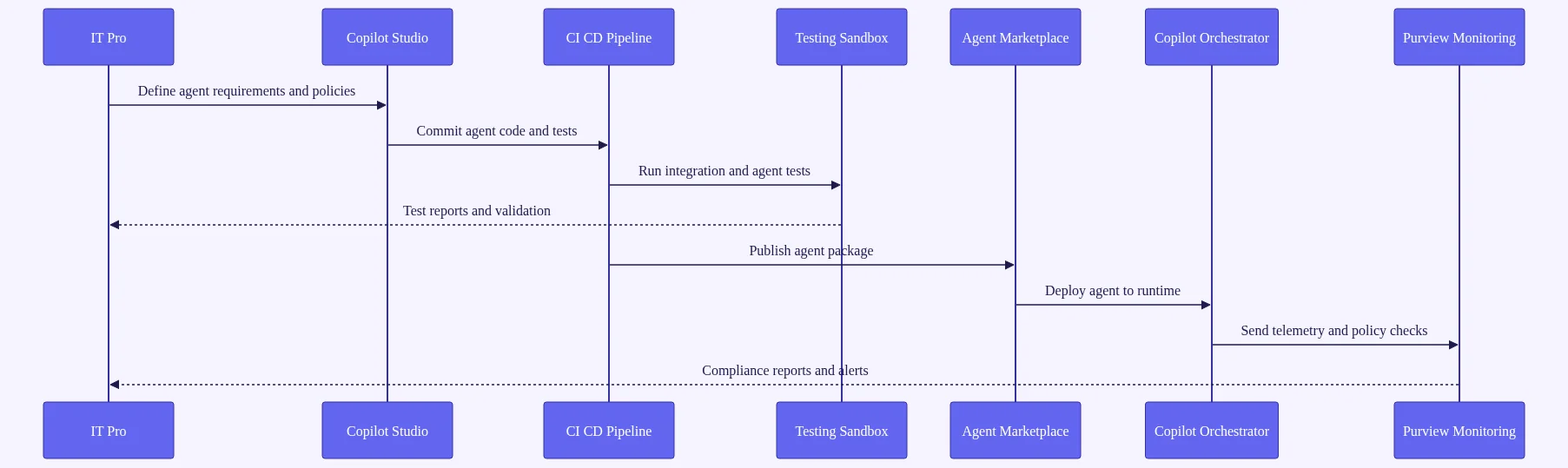
Phase 1 — Readiness Assessment: Tenant Health, Data Governance, and License Audit
Your m365 copilot enterprise deployment starts with a readiness assessment across four dimensions:
- Data hygiene: SharePoint oversharing, stale content, orphaned sites
- Identity governance: Entra ID health, MFA coverage, guest access policies
- License alignment: E3 vs. E5 vs. Copilot add-on optimization
- Network performance: Latency to Microsoft 365 endpoints
Run the Microsoft 365 Copilot Readiness Assessment tool in the admin center. It provides an automated readiness score and a prioritized remediation backlog — a significant time-saver compared to manual audits.
Phase 1 must also include a Microsoft Purview data classification sprint. Before enabling Copilot at scale, ensure sensitive data — PII, financial records, intellectual property — is correctly labeled and protected. Without this step, Copilot can inadvertently surface restricted content to unauthorized users.
Phase 2 — Pilot Design: Selecting Use Cases, User Groups, and Success Metrics
Pilot design best practices for Copilot Pages enterprise deployment:
- Select three to five high-impact, measurable use cases (meeting summarization, RFP drafting, IT ticket triage)
- Recruit a cross-functional cohort of 50 to 150 users representing different roles and technical aptitudes
- Establish baseline productivity metrics before go-live
- Define success metrics upfront using the Microsoft Copilot Dashboard, which tracks adoption rates, feature utilization, user sentiment scores, and estimated time savings
Phase 3 — Scale and Govern: Center of Excellence, Change Management, and Ongoing Optimization
The Copilot Center of Excellence (CoE) model is Microsoft’s recommended governance structure. It’s a cross-functional team comprising IT, security, HR, legal, and business champions who own agent governance, maker enablement, and continuous improvement.
Change management is consistently the number-one deployment failure factor. Invest in role-specific training — not generic demos. Create internal Copilot Champions networks and use Viva Learning to deliver just-in-time skill-building content directly in the flow of work.
Post-deployment optimization should follow a quarterly cadence:
- Review Copilot Dashboard analytics
- Retire underperforming agents
- Promote high-adoption use cases across the organization
- Align the Copilot roadmap with the Microsoft release calendar
For your security checklist, enable Copilot interaction logging in Purview, configure Conditional Access policies for Copilot endpoints, and review plugin permissions using the Copilot Plugin Governance panel in the admin center. See our internal enterprise deployment checklist for a printable version.
Microsoft 365 Copilot 2026 Security, Governance, and Responsible AI Framework
Security and governance aren’t afterthoughts in Wave 2 — they’re foundational. Here’s what IT pros and compliance teams need to know.
Data Residency, Privacy Boundaries, and the Microsoft Copilot Trust Architecture
Microsoft’s Copilot Trust Architecture rests on three pillars:
- Data stays within the Microsoft 365 compliance boundary — no training on customer data
- All Copilot interactions are logged and auditable via Microsoft Purview
- User permissions are strictly enforced — Copilot only surfaces content the user is already authorized to access
Data residency controls have been significantly enhanced. Organizations can now specify that Copilot processing occurs within specific Azure geographic regions, addressing data sovereignty requirements for EU (GDPR), UK, Australia, and other regulated markets.
Responsible AI Controls: Content Filters, Audit Logs, and Bias Mitigation
Wave 2 introduces Copilot Content Filters — configurable sensitivity controls that prevent agents from generating content related to specified topics, such as competitor names, M&A activity, or restricted product lines. This is a critical feature for legal and compliance teams.
The new Responsible AI dashboard in the Microsoft 365 admin center provides visibility into agent behavior patterns, flagged interactions, content filter trigger rates, and user feedback scores. This enables proactive governance rather than reactive incident response.
For organizations in regulated industries, Microsoft has introduced Copilot Compliance Profiles — pre-configured governance templates aligned to HIPAA, FedRAMP, SOC 2, and ISO 27001 that can be applied to the tenant quickly. You can review Microsoft’s responsible AI principles at microsoft.com/responsible-ai.
Managing Agent Permissions and Least-Privilege Access at Enterprise Scale
Agent permission management now follows a least-privilege model. When deploying a custom agent in Copilot Studio, administrators must explicitly grant each permission scope — read calendar, write SharePoint, query Dynamics 365. Agents cannot self-escalate privileges.
Microsoft Entra ID’s Workload Identity capabilities extend to Copilot agents in Wave 2. Each deployed agent receives a managed identity, enabling full audit trails of agent-initiated actions across all connected systems.
Real-World Microsoft 365 Copilot 2026 Use Cases: ROI Stories and Lessons Learned
Theory is useful. Patterns from real deployments are more useful. Here are representative scenarios drawn from common enterprise deployment archetypes.
Financial Services: Autonomous Compliance Reporting with Copilot Agents
Financial services organizations deploying Compliance Reporting Agents in Wave 2 are automating the aggregation of regulatory data from multiple internal systems into a single Copilot Page. Organizations following this pattern report meaningful reductions in compliance report preparation time and manual analyst hours — though specific results vary by data quality and organizational readiness.
Key lesson: Data governance preparation — Purview labeling and SharePoint permission cleanup — typically consumes the majority of the total project timeline. Organizations that underinvest in pre-deployment data hygiene consistently see delayed go-lives and governance incidents.
Manufacturing: Supply Chain Intelligence and Field Service Automation
Manufacturers implementing Supply Chain Disruption Agents integrated with Dynamics 365 Supply Chain Management can monitor supplier feeds and logistics APIs simultaneously, proactively alerting procurement teams to disruptions earlier than manual monitoring processes allow.
Field Service automation use cases show strong results as well. The Field Service Copilot Agent autonomously schedules technician dispatches based on skill matching, geographic proximity, parts availability, and SLA priority — reducing scheduling overhead and improving first-time fix rates.
Professional Services: Accelerating Client Deliverables with Copilot Pages
Professional services firms piloting Copilot Pages for client deliverable production report significant reductions in document production time. Consultants use Copilot Pages to synthesize research, structure findings, and draft recommendations — with client feedback often improving due to more consistent document structure and depth.
Lesson learned: The biggest adoption barrier in professional services isn’t technology — it’s consultant reluctance to share AI-assisted work with clients. Firms that address this through transparent AI disclosure policies and quality review workflows see substantially higher adoption rates than those that leave it to individual discretion.
Cross-industry pattern: Organizations that follow the phased deployment model — readiness, pilot, scale — with a dedicated CoE achieve positive ROI on Microsoft 365 Copilot licensing significantly faster than organizations that skip the governance phase and must deal with rework, security incidents, and low adoption.
Frequently Asked Questions
What’s new in Microsoft 365 Copilot 2026 compared to the original Copilot release?
Microsoft 365 Copilot 2026 Wave 2 introduces autonomous multi-agent orchestration, persistent Copilot Pages for collaborative AI workspaces, expanded Copilot Studio with CI/CD support, deeper Dynamics 365 agent integration, and enterprise governance controls via Microsoft Purview. The core shift is from reactive AI assistance to proactive, autonomous workflow execution that spans multiple apps without user intervention at each step.
How do Copilot Pages differ from Microsoft Loop components?
Copilot Pages are full-page, persistent AI-generated workspaces with their own URL, version history, and permission model — designed for project-level collaboration. Loop components are portable, embeddable blocks that live inside other documents and apps. Copilot Pages support richer governance controls, Dynamics 365 data integration, and Power Automate triggers, making them better suited for enterprise use cases requiring compliance and auditability.
What licenses do organizations need to access Wave 2 agent capabilities?
Core Wave 2 agent capabilities require the Microsoft 365 Copilot add-on license on top of a qualifying Microsoft 365 E3 or E5 base license. Dynamics 365-specific agents may require additional Dynamics 365 Copilot capacity licenses depending on the module. Always consult the current Microsoft licensing guide and your Microsoft account team to optimize your license mix for current pricing.
How can Power Platform makers build custom agents in Copilot Studio 2026?
Power Platform makers can use the new visual Agent Designer canvas in Copilot Studio to declaratively define agent triggers, knowledge sources, action sets, and escalation paths without writing code. Advanced makers and pro-developers can extend agents using YAML manifests, custom plugins, and Azure DevOps or GitHub integration for version-controlled, CI/CD-enabled agent deployment pipelines.
What are the most important governance steps before deploying Microsoft 365 Copilot 2026 at enterprise scale?
The critical pre-deployment governance steps are: run the Microsoft 365 Copilot Readiness Assessment in the admin center; complete a Microsoft Purview data classification and sensitivity labeling sprint; audit SharePoint permissions to eliminate oversharing; configure Copilot interaction logging for audit compliance; and establish a Copilot Center of Excellence with defined agent governance policies before enabling Wave 2 features broadly.
Is Microsoft 365 Copilot 2026 suitable for regulated industries like healthcare and financial services?
Yes. Wave 2 introduces Copilot Compliance Profiles aligned to HIPAA, FedRAMP, SOC 2, and ISO 27001, along with enhanced data residency controls, Copilot Content Filters, and full audit logging via Microsoft Purview. Microsoft’s Copilot Trust Architecture ensures customer data is never used for model training and all processing respects existing user permission boundaries — making Wave 2 viable for regulated enterprise environments with proper configuration.
Conclusion: Your Next Step with Microsoft 365 Copilot 2026
Microsoft 365 Copilot 2026 Wave 2 isn’t a feature update — it’s a fundamental reimagining of how enterprise work gets done. From autonomous multi-agent orchestration and persistent Copilot Pages to the deepest Dynamics 365 integration Microsoft has ever shipped, Wave 2 gives developers, consultants, Power Platform makers, and IT pros an unprecedented toolkit to drive measurable business transformation.
The organizations that will capture the most value aren’t simply the ones that flip the switch on Wave 2 features. They’re the ones that invest in data governance, deploy with a phased strategy, build a Copilot Center of Excellence, and treat agent development as a first-class engineering discipline.
The roadmap is clear. The tools are ready. The competitive advantage belongs to those who act now.
Here’s your action plan for this week:
- Run the Microsoft 365 Copilot Readiness Assessment in your admin center
- Identify your highest-impact use case from the examples in this guide
- Schedule a Purview data classification review with your security team
- Nominate your first Copilot Champion from a business-facing team
- Subscribe to our newsletter for weekly Microsoft 365 Copilot deployment insights
Download our free Wave 2 Enterprise Readiness Checklist to accelerate your journey — and start making your organization an AI-first enterprise today.