Introduction to Microsoft 365 Copilot Cowork: We’ve Reached the Next Phase of AI
The first generation of AI helped us find information. The second generation helped us create content. The third generation is helping us complete work.
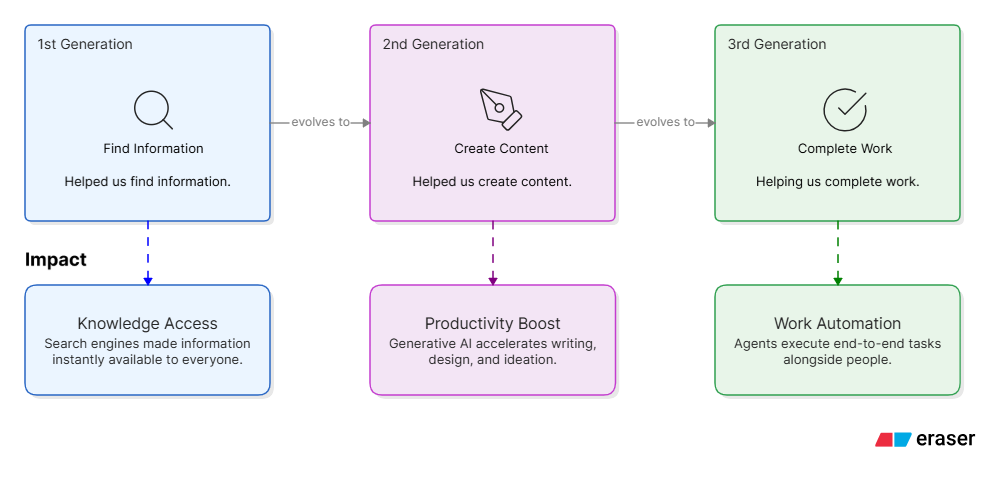
That third generation has officially arrived with Microsoft 365 Copilot Cowork, Microsoft’s newest evolution of AI-powered productivity. Unlike traditional AI assistants that answer questions, generate content, or summarize information, Copilot Cowork is designed to execute complex, long-running work on your behalf across Microsoft 365 while keeping humans in control.
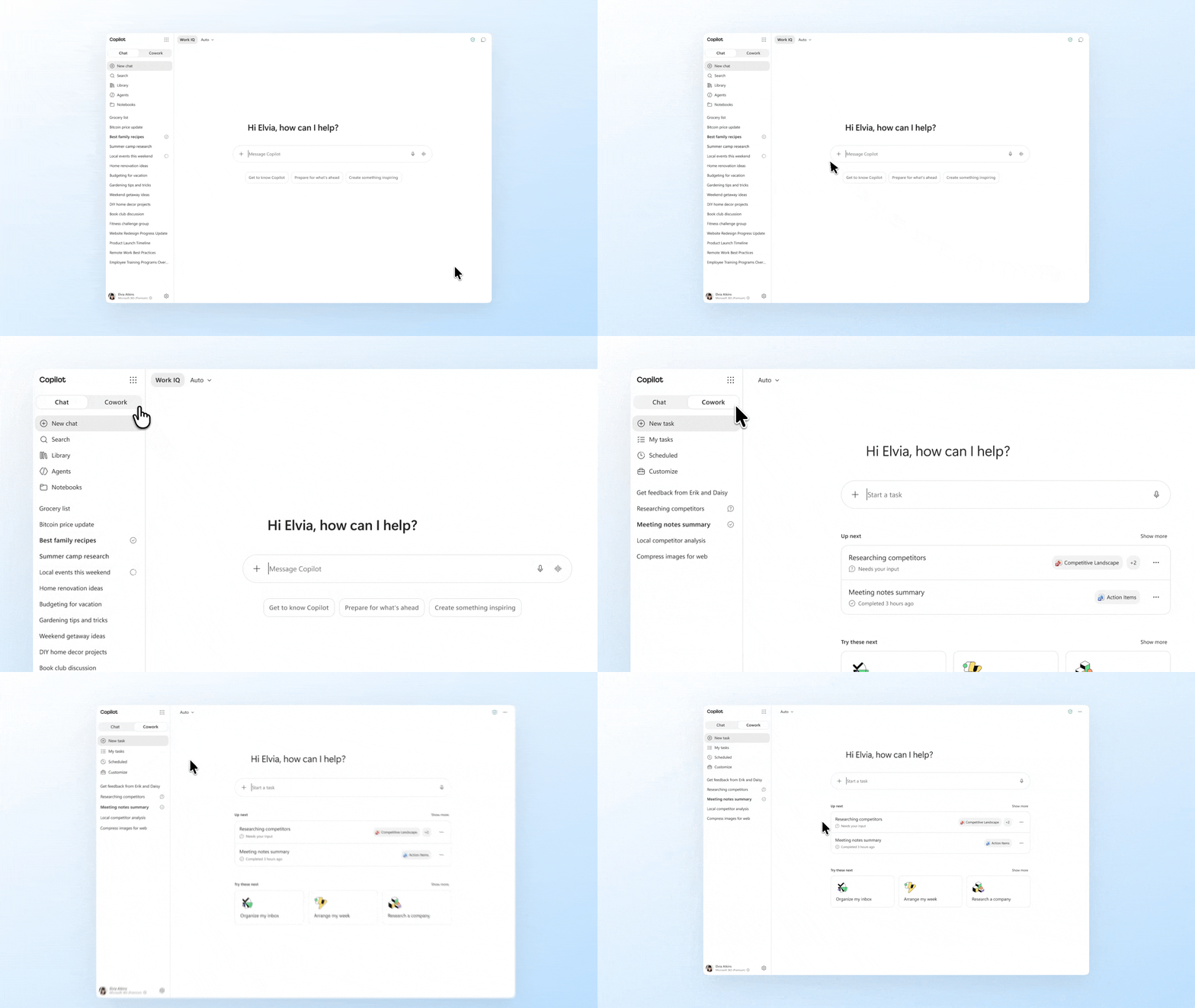
Imagine asking an AI assistant:
“Prepare me for tomorrow’s customer executive review. Analyze emails, summarize previous meetings, identify risks, create a briefing document, draft presentation slides, and prepare a follow-up email.”
Instead of giving you a summary and stopping there, Copilot Cowork continues working, gathering information, coordinating tasks, generating deliverables, and returning completed outcomes.
This is the shift from AI Assistant to AI Coworker.
Why Should IT Professionals Care?
Most enterprise employees don’t spend their day doing one task.
They spend their day doing dozens of connected tasks:
- Reading emails
- Reviewing Teams messages
- Searching files
- Analyzing spreadsheets
- Preparing presentations
- Scheduling meetings
- Creating reports
- Following up on action items
The problem is not lack of information.
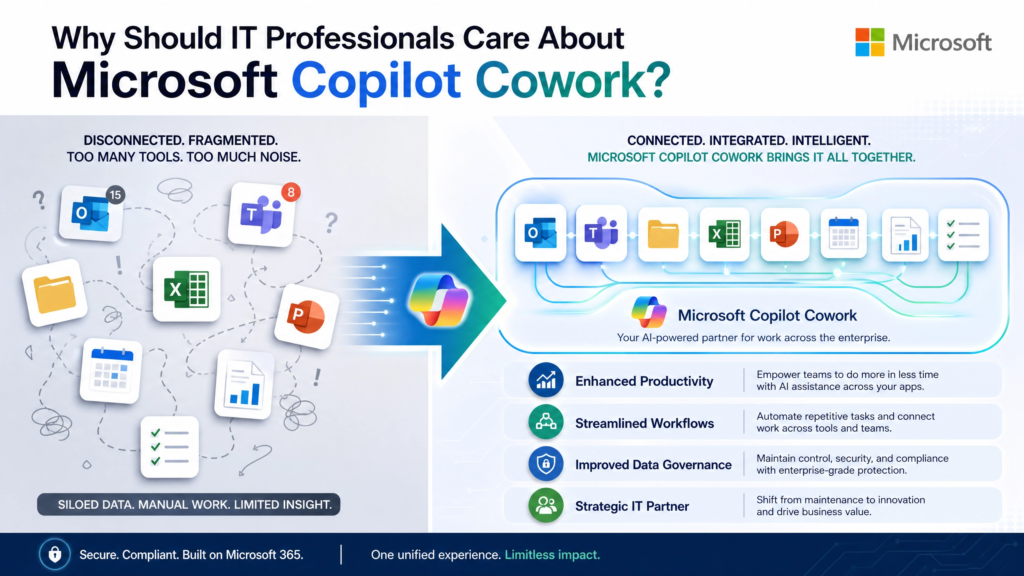
The problem is that work is fragmented across systems.
This fragmentation creates:
- Context switching
- Manual effort
- Delayed decisions
- Reduced productivity
- Employee burnout
Traditional AI tools help with pieces of the process.
Copilot Cowork helps with the entire workflow.
Microsoft describes Cowork as a system that executes complex, long-running, multi-tool tasks and returns completed work rather than simply providing drafts or recommendations.
What Exactly Is Copilot Cowork?
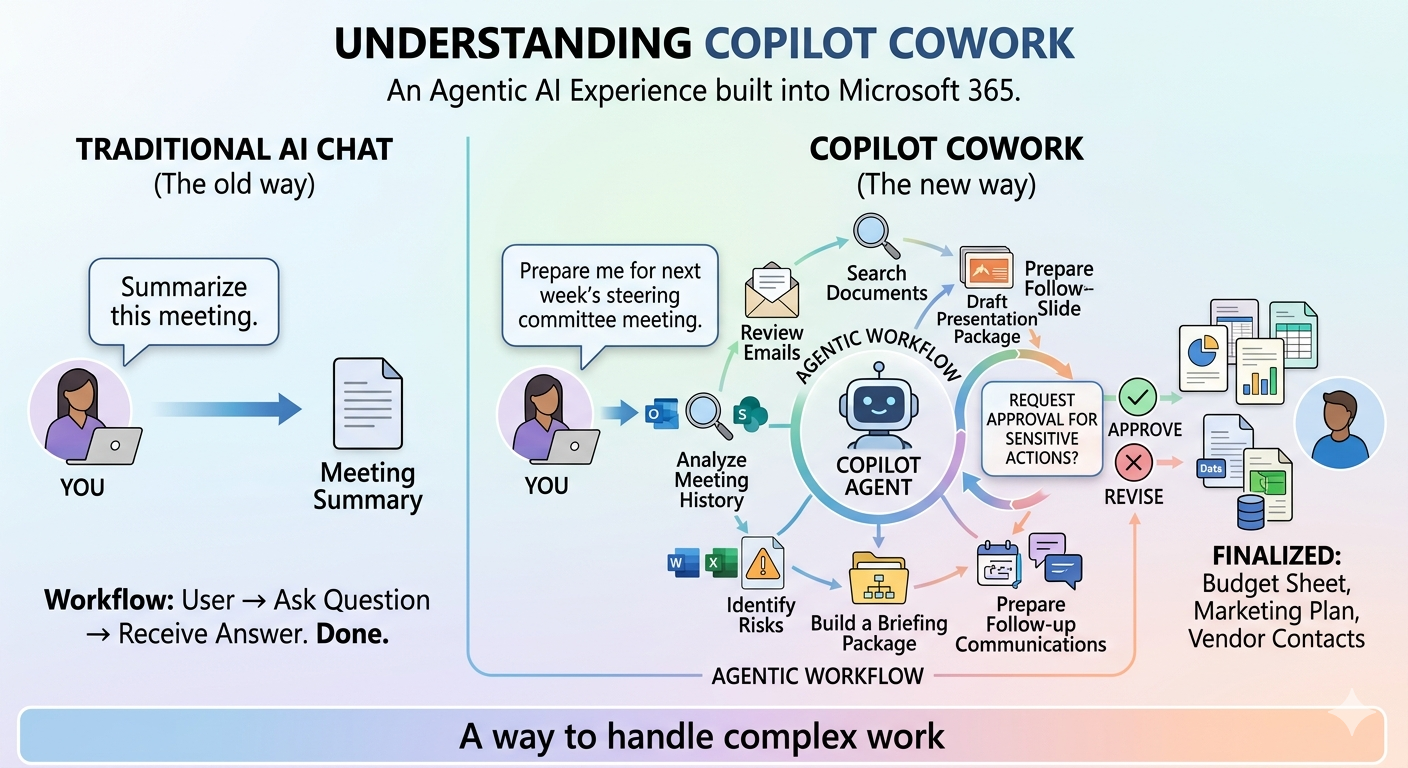
Copilot Cowork is an agentic AI experience built into Microsoft 365 Copilot.
Its purpose is simple:
You define the outcome.
Copilot Cowork figures out how to achieve it.
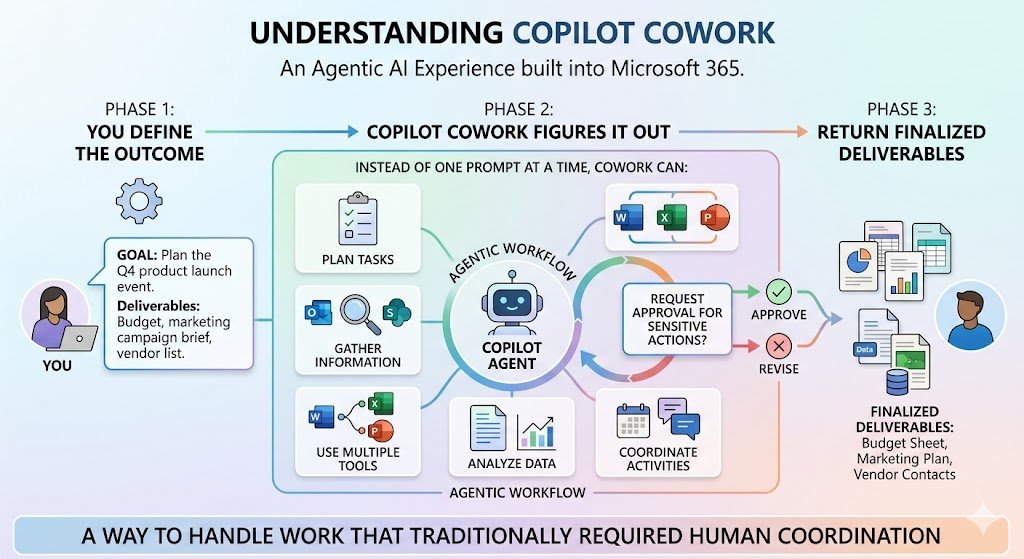
Instead of working one prompt at a time, Cowork can:
- Plan tasks
- Gather information
- Use multiple tools
- Generate documents
- Analyze data
- Coordinate activities
- Request approval for sensitive actions
- Return finalized deliverables
Microsoft positions Cowork as a way to handle work that traditionally required significant manual effort across multiple tools and applications.
From Assistant to Coworker: Understanding the Difference
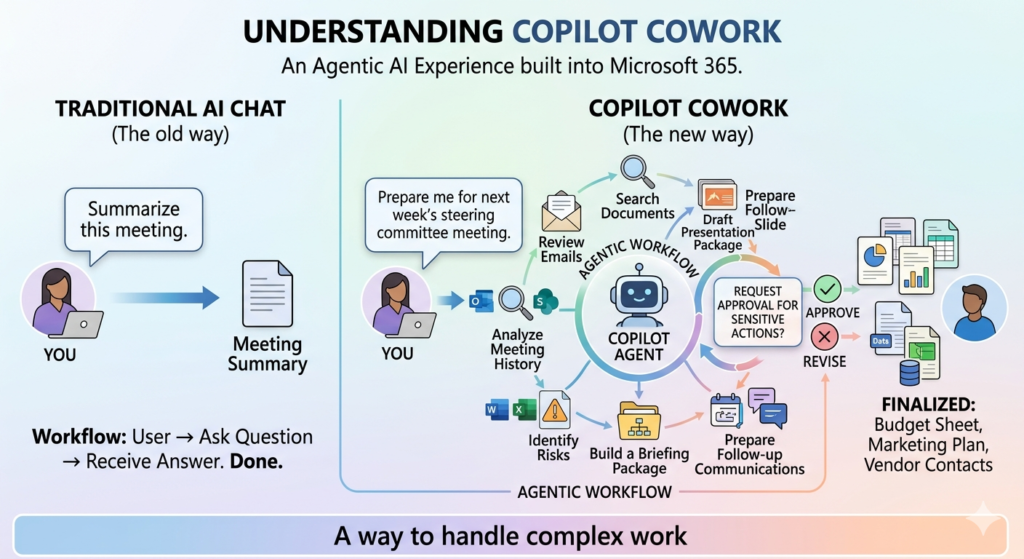
| Traditional AI Chat | Copilot Cowork |
| Workflow: User → Ask Question → Receive Answer Example: “Summarize this meeting.” You receive a summary. Done. | Workflow: User → Define Outcome → AI Plans → AI Executes → Human Reviews → Deliverable Produced Example: “Prepare me for next week’s steering committee meeting.” Cowork can: Review emails, Search documents, Analyze meeting history, Collect action items, Identify risks, Build a briefing package, Draft presentation slides, Prepare follow-up communications, All within a connected workflow. |
Why Microsoft Copilot Cowork Is Different
Many AI products are now introducing agent-style experiences.
Microsoft’s differentiator comes from its integration with Microsoft 365.
According to Microsoft, five major capabilities make Cowork different:
1. Cloud-Native Execution
Cowork runs in Microsoft’s cloud environment.
This means:
- Tasks continue running even when your laptop is turned off
- Files are not stored locally
- Enterprise security controls remain enforced
This is particularly important for long-running enterprise workflows.
2. Grounded in Business Context
Unlike generic AI systems, Cowork understands organizational information through Microsoft’s context services.
This includes:
- Emails
- Meetings
- Calendars
- Files
- Teams conversations
- People information
- Connected business systems
This enables responses that are grounded in business context rather than internet knowledge alone.
3. Enterprise Security and Compliance
Cowork operates within the Microsoft 365 trust boundary.
Security capabilities highlighted by Microsoft include:
- User permission inheritance
- Audit logging
- eDiscovery support
- Communication compliance
- Data lifecycle controls
- Microsoft Purview governance integration
Users only access information they are already permitted to access.
4. Multi-Model Intelligence
Microsoft has adopted a multi-model strategy for Cowork.
Administrators and users can leverage model selection capabilities, allowing Cowork to choose models based on workload requirements and cost considerations.
5. Extensibility
Cowork can be extended through plugins, skills, and integrations.
Microsoft lists capabilities across:
- Dynamics 365
- Jira
- Salesforce
- ServiceNow
- SAP
- Workday
- Zendesk
and additional partner ecosystems.
Latest Features Introduced in 2026
Copilot Cowork’s recent General Availability release introduced several significant capabilities.
Model Selection
Users can choose:
- Auto mode
- Specific AI models
- Optimized reasoning models
depending on the task.
Image Generation
Cowork can generate images directly from prompts and save outputs into Microsoft 365 workflows. [learn.microsoft.com]
Browser Use
Cowork can perform supported web-based tasks using Microsoft Edge while following organizational policies.
Guided Skill Creation
Users can build reusable skills using guided conversational experiences rather than traditional development.
Brand-Aware Presentations
PowerPoint presentations can automatically adopt organizational branding and templates.
Plugins and Connected Systems
New integrations continue expanding the ecosystem.
Examples include:
- Dynamics 365
- Salesforce
- Jira
- ServiceNow
- SAP
- Adobe
and various enterprise platforms.
The Best Business Scenario: Executive Meeting Preparation
If you want to demonstrate Copilot Cowork to leadership, this is arguably the most compelling scenario.
The Challenge
Tomorrow morning you have a customer executive review.
Normally you would spend hours:
- Reading emails
- Reviewing notes
- Searching documents
- Building slides
- Identifying risks
- Creating summaries
The Copilot Cowork Prompt
Prepare me for tomorrow’s executive meeting with Contoso. Gather relevant emails, Teams discussions, meeting notes, action items, customer concerns, risks, and opportunities. Create a one-page executive briefing and draft presentation deck.
What Cowork Can Do
Step 1: Gather Context
Review:
- Emails
- Meetings
- Files
- Teams conversations
Step 2: Analyze
Identify:
- Risks
- Open actions
- Opportunities
- Stakeholder concerns
Step 3: Create
Generate:
- Executive briefing
- PowerPoint slides
- Talking points
Step 4: Prepare Follow-up
Draft:
- Customer follow-up email
- Action item summary
- Leadership update
This is where Cowork transitions from simply assisting to actually moving work forward.
Security and Governance: The Question Every CIO Asks
Whenever AI enters the enterprise, the first question isn’t productivity.
It’s trust.
Microsoft addresses this through several governance principles.
Permission Boundaries
Cowork only accesses information available to the signed-in user.
Approval-Based Actions
Sensitive actions require approval.
Examples include:
- Sending emails
- Posting Teams messages
- Scheduling meetings
This keeps humans in control of final decisions.
Administrative Controls
Organizations can:
- Enable or disable Cowork
- Define spending limits
- Monitor consumption
- Configure governance settings
Admins maintain control over rollout and adoption.
Getting Started with Copilot Cowork
For organizations already invested in Microsoft 365, adoption is straightforward.
Step 1
Enable Copilot Cowork.
Step 2
Configure governance and spending controls.
Step 3
Assign access to users.
Step 4
Identify repeatable knowledge-work scenarios.
Step 5
Start with business outcomes rather than prompts.
Instead of saying:
Summarize these emails.
Say:
Prepare a customer health report from these emails, meetings, and supporting documents.
The more outcome-oriented the request, the more value Cowork can deliver.
The Future of Work Is Outcome-Based
The history of productivity software has followed a predictable pattern.
First we digitized information.
Then we automated processes.
Now we are delegating work.
Copilot Cowork represents Microsoft’s vision for that future.
It’s not trying to replace employees.
It’s designed to eliminate repetitive knowledge work so people can focus on judgment, creativity, relationships, and decision-making.
For IT professionals, architects, administrators, and consultants, understanding Copilot Cowork today may be as important as understanding cloud computing was a decade ago.
The organizations that successfully combine AI, governance, security, and business processes will be the organizations that define the next generation of digital work.
And that journey is no longer about asking AI better questions.
It’s about assigning meaningful work and letting AI help complete it.
Key Takeaway
Traditional AI helps you think.
Microsoft 365 Copilot helps you work.
Copilot Cowork helps you finish the work.